The short answer
- A social media competitor analysis is a repeatable look at what a set of competing accounts post, how each post did against that account’s own usual, and why the best ones worked.
- Pick 5 to 10 accounts that sell to the same people, work out each account’s usual result by format, and keep the posts at 2× or more.
- Follower counts and raw views tell you who is big. The posts that beat their own account’s usual tell you what to make.
- Use only numbers any visitor can see, so every account is measured the same way, and repeat the analysis on a schedule.
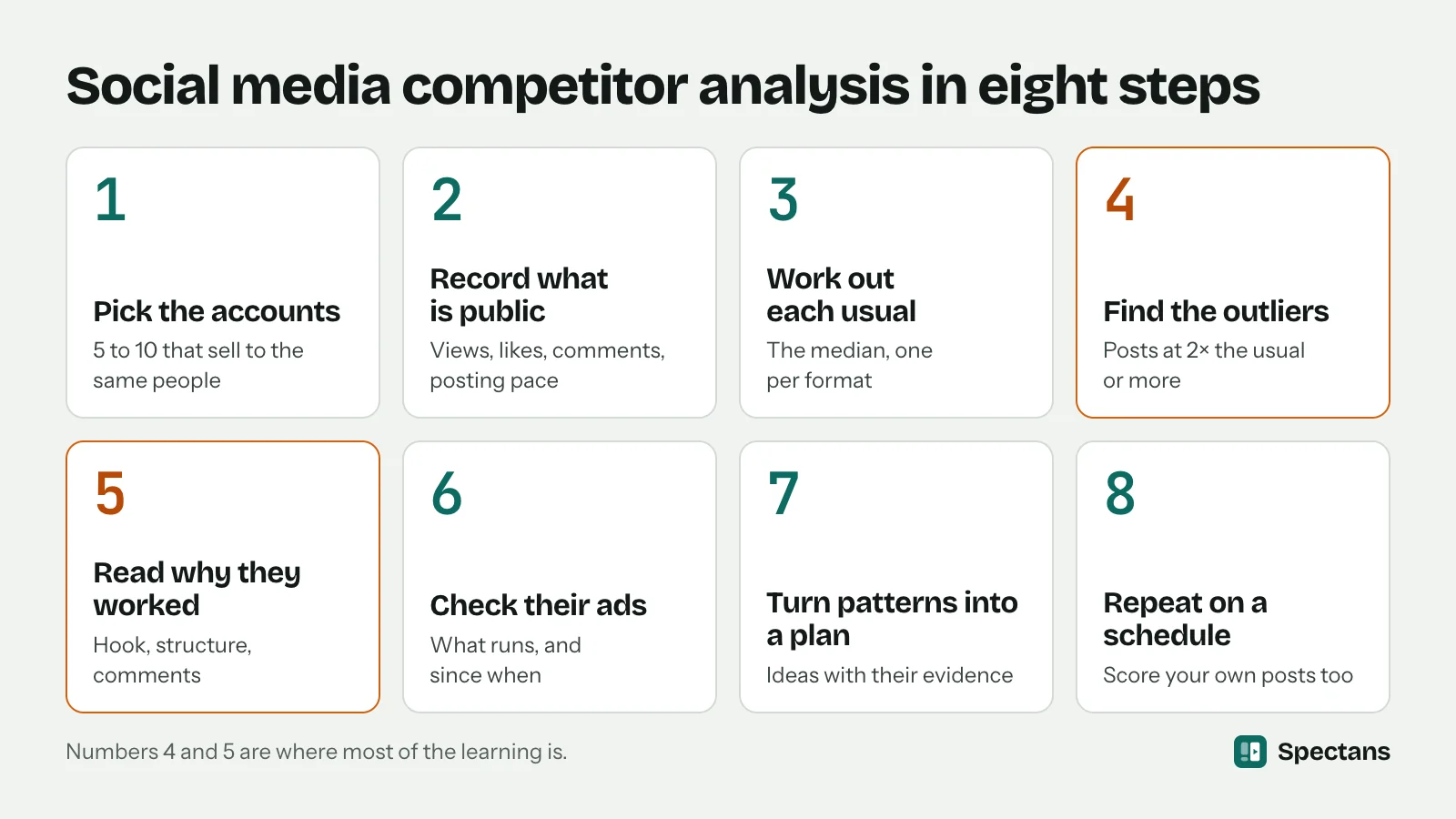
A social media competitor analysis is a repeatable look at what a set of competing accounts post, how each post did against that account’s own usual, and why the best ones worked. Pick 5 to 10 accounts, work out each account’s usual result by format, keep the posts at 2× or more, read why they worked, and turn the patterns into your own plan. The eight steps below work on Instagram, TikTok and Facebook with a spreadsheet and numbers any visitor can see.
What a competitor analysis should give you
Most competitor analysis templates end in a table of follower counts, posting frequency and an engagement rate. That table tells you who is big. It does not tell you what to post next week.
A useful analysis ends with three things:
- A usual for every account. What a normal post gets, by format. This is the baseline.
- A short list of posts that beat it. These are the outlier posts.
- The reasons, grouped into patterns. The same idea working on several accounts is something you can plan from.
Step 1. Pick 5 to 10 accounts
Choose accounts that sell to the same people you do. That is a narrower test than “same industry”. A national chain and a single studio are in the same industry and reach different people.
- Include accounts your own size. Their wins are the easiest to repeat.
- Include one or two larger accounts for reach, and expect to learn less from them.
- Add your own account. It gets measured the same way.
- Cover each network you post on. An account that matters on TikTok may be quiet on Facebook.
Five to ten is enough to see a pattern and few enough to keep up by hand.
Step 2. Record what is public
Use only numbers that any visitor can see. Then every account, yours included, is measured the same way. This is what each network documents, read on 27 November 2026:
| Network | What a visitor can see | What we could not confirm |
|---|---|---|
| Like and view counts, unless the account hides them on a post. Comments. | Whether photo and carousel posts show a view count to visitors. Whether save counts are public. | |
| TikTok | TikTok’s developer documentation describes views, likes, comments, shares and favourites as public data. | No TikTok help page we read lists which counts the app displays on a video. |
| View counts on public videos and reels. Reaction totals, which a Page cannot hide. Comments. | View counts on photo and text posts. Social Media Today reported in July 2026 that only the creator sees them. |
That is why the result you compare changes with the format: views for TikTok videos and Instagram video, likes plus comments for other Instagram posts, reactions plus comments for Facebook posts. A view is also a different event on each network, which we cover in what counts as a view.
For each account, note the followers and posts per week. For each post from the last two or three months, note the date, the format, the opening line and the public result.
Step 3. Work out each account’s usual
Sort an account’s recent results for one format and take the middle value. That is the median, and it is the account’s usual for that format.
- Use the median, not the average. One huge post pulls an average up and hides the next good one.
- Keep one usual per format. Reels and carousels on the same account get very different numbers.
- Wait for 10 posts in a format before you trust the usual. Spectans uses the last 30 posts from the past 365 days.
- Compare posts at the same age. A two-day-old post has not finished collecting views.
The arithmetic, with a spreadsheet template and a calculator, is in how to find outlier posts.
Step 4. Find the posts at 2× or more
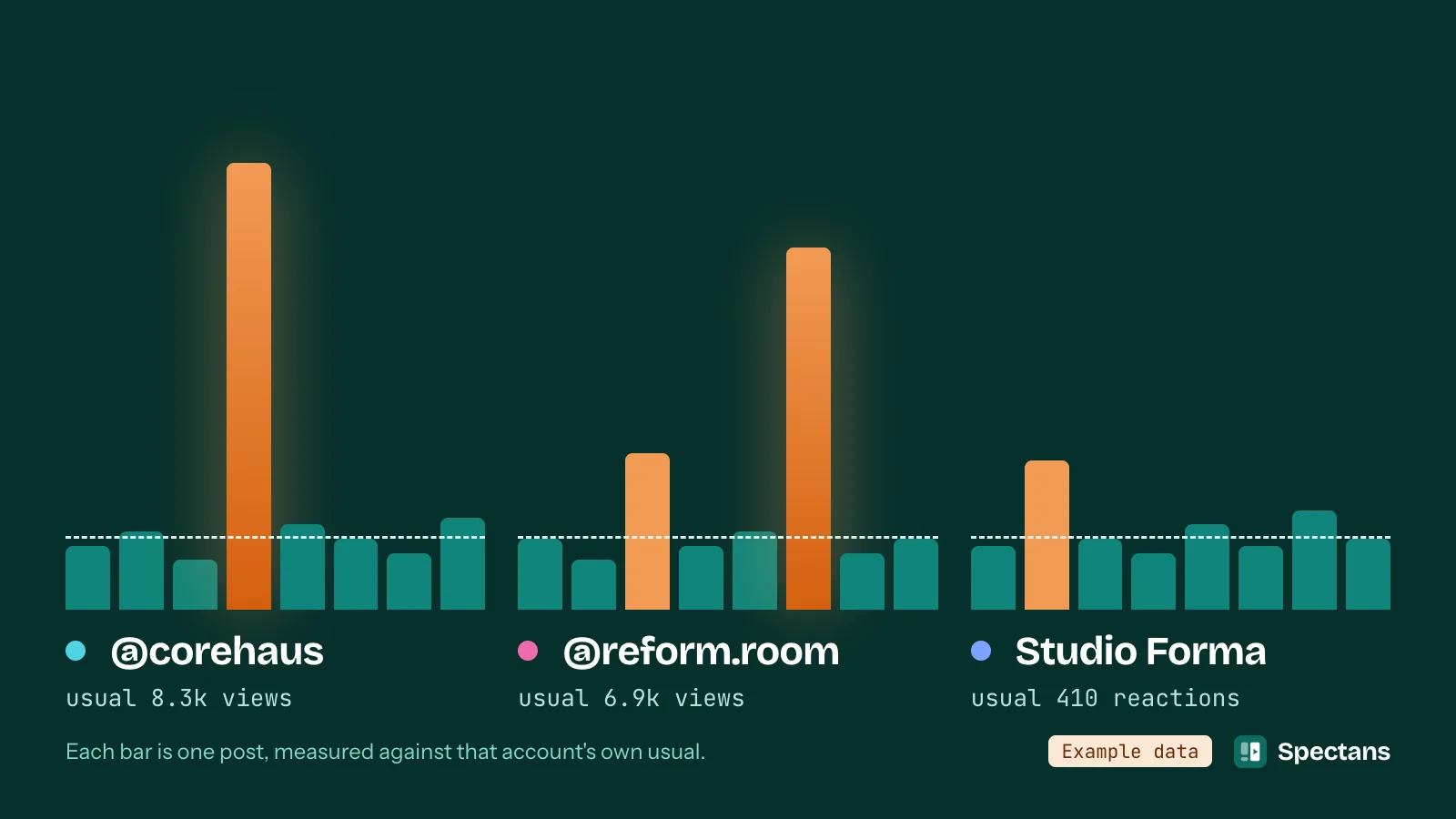
Divide each post’s result by its account’s usual. The answer is the outlier multiple. Keep the posts at 2× or more.
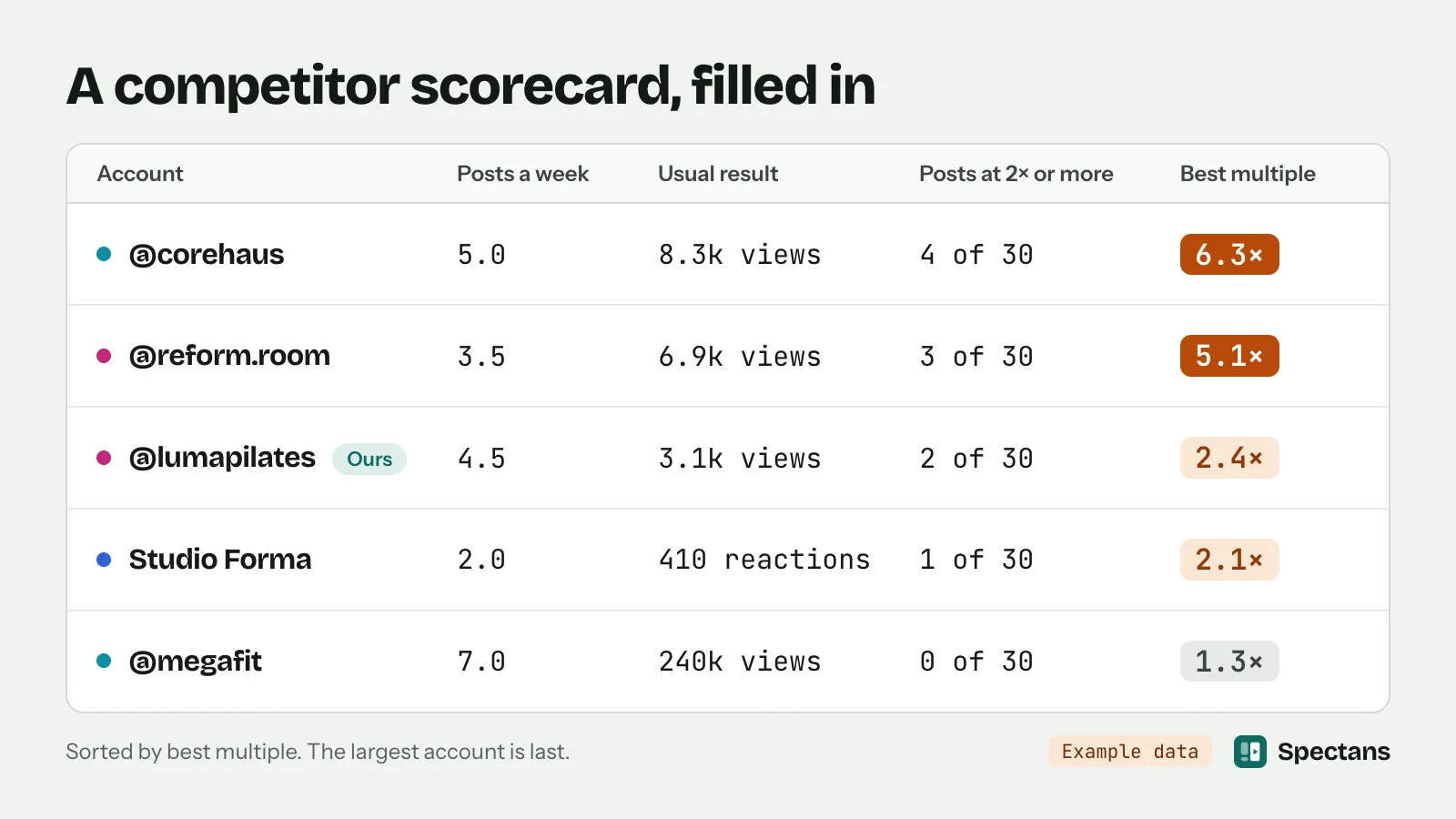
Here is a filled-in scorecard for a pilates niche. The data is invented for the example.
| Account | Network | Followers | Posts a week | Usual result | Posts at 2× or more (last 30) | Best post | Best multiple |
|---|---|---|---|---|---|---|---|
| @corehaus | TikTok | 61,000 | 5.0 | 8,300 views | 4 | You’ve been doing the hundred wrong | 6.3× |
| @reform.room | 25,000 | 3.5 | 6,900 views | 3 | What a first class costs, line by line | 5.1× | |
| @lumapilates | 8,400 | 4.5 | 3,100 views | 2 | Three stretches for desk backs | 2.4× | |
| Studio Forma | 12,000 | 2.0 | 410 reactions | 1 | 8 weeks of reformer, before and after | 2.1× | |
| @megafit | TikTok | 1.2M | 7.0 | 240,000 views | 0 | Day in the life of a trainer | 1.3× |
Copy the column headings into a spreadsheet and you have the template. Sorted by followers, @megafit is first. Sorted by best multiple, it is last, and the 61,000-follower account has the post most worth studying.
Step 5. Read why they worked
A multiple tells you that a post worked. It does not tell you why. For each kept post, write down:
- The hook. The first line said and the first thing shown. Instagram’s head, Adam Mosseri, named watch time, likes and sends as the top three ranking signals in January 2025, and watch time starts with whether people stay past the opening. More in our guide to video hooks.
- The structure. Problem then fix, list, before and after, question then answer.
- The format and length. Reel, carousel, photo, talking head, voice-over.
- The comments. The questions people ask are requests for the next post. TikTok’s Comment insights feature can sort the comments on another creator’s post into topics, where it is available. See content ideas from comments.
Save each post with these notes in a swipe file, so the evidence stays next to the idea.
Step 6. Check their ads
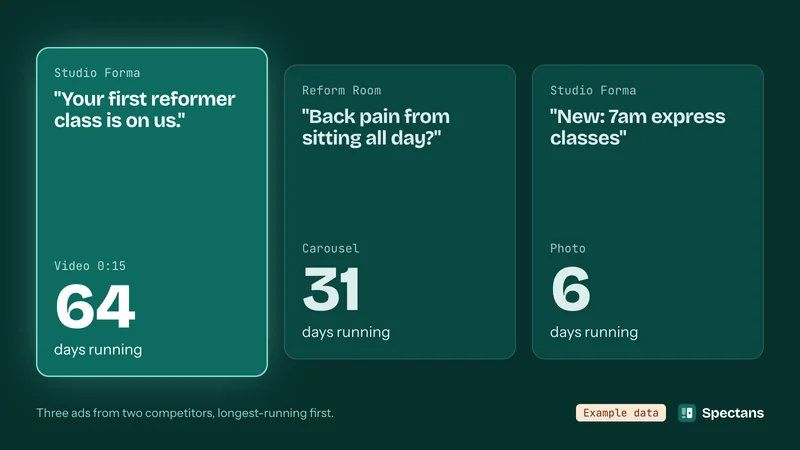
Look each competitor up in the Meta Ad Library. Meta says anyone can search it, with or without a Facebook account, and that it holds all ads currently running across its apps. For each ad you get the creative, the advertiser and the date it started running.
It answers two questions:
- Was the outlier paid for? If the same video is running as an ad, its organic numbers may have had help.
- What do they keep paying for? An ad that has run for months is one the advertiser chose not to turn off.
It does not show what an ordinary commercial ad cost or how it performed. Spend and impressions appear only for ads about social issues, elections or politics, and only as ranges. Our Meta Ad Library guide goes through the filters.
Step 7. Turn patterns into a plan
Group the kept posts by idea, not by account. Then look for repeats.
| What you see | What it becomes |
|---|---|
| “You’re doing it wrong” corrections beat the usual on three accounts | A weekly correction series in your own voice |
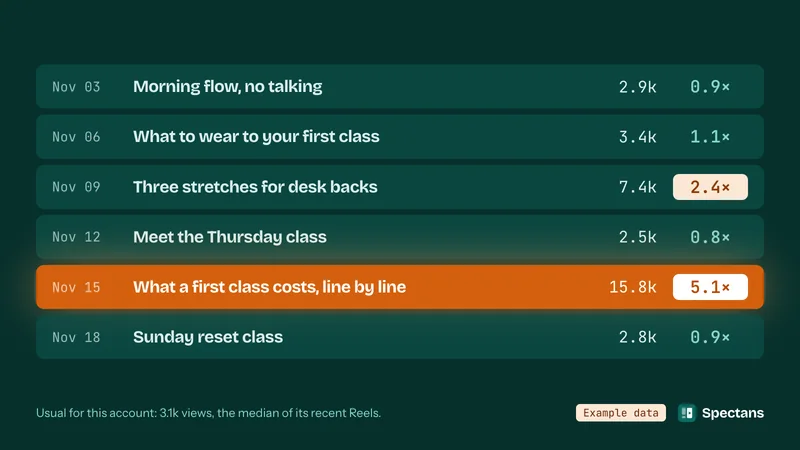
| A price breakdown reached 5.1× and the comments ask about cost | A post that answers the price question plainly |
| Your own desk-stretch Reel reached 2.4× and has no follow-up | Part two, while the first is still being found |
Each row is a content idea with its evidence attached. Copy the pattern, not the post: the angle, the structure and the question it answers, said your way.
Step 8. Repeat on a schedule
One analysis is a snapshot. The value comes from running it again.
- Weekly if the niche posts daily, monthly if it is slower.
- Keep the same accounts, formats and threshold, so months are comparable.
- Score your own posts against your own usual once they are live. That closes the loop: you learn whether the borrowed pattern worked for you.
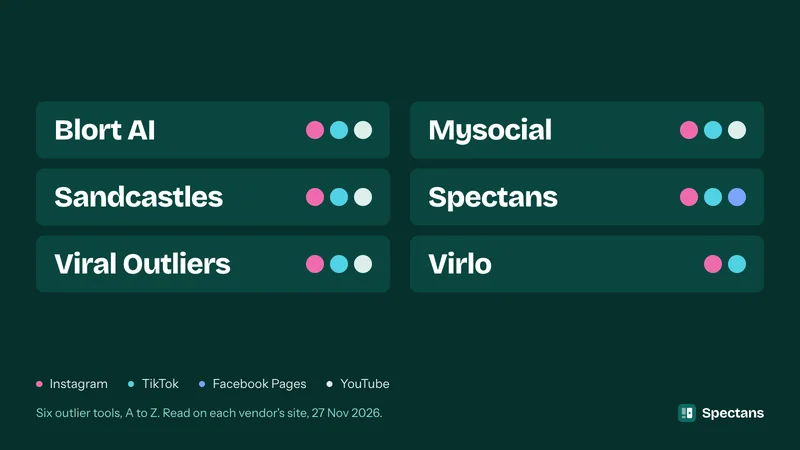
Done by hand, steps 2 to 4 take the most time, because every number has to be read off a screen again each week. That is the part tools take over. Spectans is the one we make: it tracks the accounts you choose, scores every post against its account’s usual and reads competitors’ Meta ads. It is in private build, with no public price yet. Other tools exist today, and we compare them fairly in outlier finder tools, compared.
Questions
-
What is a social media competitor analysis?
It is a repeatable review of what competing accounts post on social networks, how each post performed against that account’s own usual, and why the best posts worked. The output is a short list of patterns you can use, not a ranking of who has the most followers.
-
How many competitors should I analyse?
Five to ten accounts is enough to see patterns and small enough to keep up by hand. Choose accounts that sell to the same people you do, and include some your own size. A pattern that shows up on three of them is worth more than one post from the largest account.
-
What competitor data is public on Instagram, TikTok and Facebook?
Instagram shows like and view counts on posts by default, and the account can hide them. Facebook shows view counts on public videos and reels and reaction totals on Page posts. TikTok’s developer documentation describes views, likes, comments, shares and favourites as public data. Reach, watch time and saves on Instagram are owner-only insights as far as the networks document them.
-
Can I see how much a competitor spends on ads?
Not for ordinary commercial ads. The Meta Ad Library shows each running ad, the advertiser and the date it started. Amount spent and impressions are shown only for ads about social issues, elections or politics, and then only as ranges.
-
How often should I repeat a competitor analysis?
Often enough to catch a post while the idea is still fresh. Weekly works for niches that post daily, monthly for slower ones. Keep the same accounts, the same formats and the same threshold each time so one month is comparable with the next.
-
Can I do a competitor analysis for free?
Yes. Everything in this method uses numbers that any visitor can see, a spreadsheet and the free Meta Ad Library. A tool saves the collecting and the arithmetic, which is most of the time, but it does not change the method.
Sources
We last read these pages on November 27, 2026.
- Hide or unhide like counts on Instagram posts and reels Instagram Help Center
- See views on a creator or friend’s reel on Facebook Facebook Help Center
- Help article on hiding reaction counts on Facebook posts and reels Facebook Help Center
- Facebook tests post view count display Social Media Today, 6 July 2026
- Research API documentation for querying videos TikTok for Developers
- Comment insights on TikTok TikTok Support
- About the Meta Ad Library Meta Business Help Center
- Meta Ad Library Meta
- Post on the top ranking signals, 21 January 2025 Adam Mosseri, Head of Instagram
In Spectans
- Competitor tracking
Track your own accounts and your competitors’ on Instagram, TikTok and Facebook from a profile link.
- Outlier detection
Every tracked post ranked by how far it beat its own account’s usual, not by raw views.
- Competitor ads
The Meta ads each competitor runs, sorted by how long they have kept paying for them.